 CrazyGamesX.com
World of Blocks 3D
World of Blocks 3DSimilar games








World of Blocks 3D
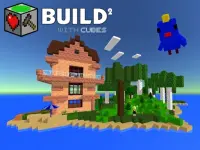
World of Blocks 3D is a sandbox game where you can craft and design worlds using a variety of resources. The game includes a flying mode that lets you view your creations from above while you explore the environment.
How To Play World of Blocks 3D
You start by visiting the website, select the game, and then use controls to move around, gather resources, and build structures, which is Clean to understand.
Controls and Features
You can use the arrow keys or WASD to move, left click to place blocks, right click to erase, space bar to jump, F to toggle flying mode, and R to reset the world. The game features a flying mode and resource gathering.
Tips
Try to build your structures in a Slow manner. Use the flying mode to check the stability of your creations and gather resources efficiently to build more.
World of Blocks 3D FAQs.
Q: What are the controls? A: Arrow keys or WASD to move, left click to place, right click to erase, space bar to jump, F to fly, R to reset.
Q: What is the objective? A: The objective is to gather resources and build structures in the world.
Q: What is the main mechanic? A: The main mechanic is building structures using gathered resources.
How To Play World of Blocks 3D
Start World of Blocks 3D by visiting the website and selecting the game. Use the controls to move around, gather resources, and build structures cleanly and efficiently. For a similar block-building experience, try Hexa Blocks.
About this game
- Supported devices
- Desktop
- Genre
- Girls Games
- Release date
- 24 October 2024
- Latest update
- 24 October 2024
- Rating
- No ratings yet