 CrazyGamesX.com
Bricks Puzzle Classic
Bricks Puzzle ClassicSimilar games





Bricks Puzzle Classic
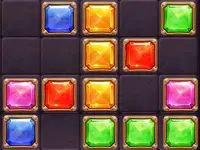
Bricks Puzzle Classic lets you stack colorful bricks as they fall, aiming to clear lines and beat your high score. The game keeps you hooked with its simple mechanics and fast-paced action, making it a way to kill time when bored.
How To Play Bricks Puzzle Classic
Use arrow keys to move, up arrow or space to rotate, and down arrow to accelerate fall, then Clean align bricks to form complete horizontal lines that clear.
Controls and Features
Controls use arrow keys for movement and rotation, with the down arrow to speed up the fall, and the goal is to align bricks to clear lines. The game features falling bricks that speed up as you progress.
Tips
Try to keep the stack low and manageable. Use the Slow acceleration to control the fall and plan your placements carefully.
Bricks Puzzle Classic FAQs.
Q: What are the controls? A: Arrow keys to move, up arrow or space to rotate, and down arrow to accelerate.
Q: What is the objective? A: Align bricks to form complete horizontal lines that clear.
Q: What is the main mechanic? A: Stacking falling bricks to clear lines.
How To Play Bricks Puzzle Classic
Use arrow keys to move, up arrow or space to rotate, and down arrow to accelerate fall, then clean align bricks to form complete horizontal lines that clear. You can play a similar experience in Brick Game Classic.
About this game
- Supported devices
- Desktop
- Genre
- Racing Games
- Release date
- 24 October 2024
- Latest update
- 24 October 2024
- Rating
- No ratings yet